


 Back
BackSmart Home Singapore: Devices, Setup and How It All Works
Smart homes in Singapore are no longer a luxury renovation add-on - 712,200 households now run one. This guide explains how the system works, what to buy for an HDB flat or condo, and how to get started.
In This Guide
- What is a smart home?
- How does a smart home work?
- How to set up a smart home?
- Top Smart Home Upgrades for
Singapore Homes - How to Get Started?
- FAQs
A smart home is a home equipped with internet-connected devices such as lights, security cameras, aircons and appliances that can be controlled remotely via smartphones or voice assistant.
This guide explains everything in the right order, starting from what a smart home actually is, to how the system works, to what to buy and how to set it up without buying incompatible hardware.
What is a Smart Home?
A Smart Home is an ecosystem where your appliances and systems are interconnected. Whether through WiFi, Bluetooth, or hardwired systems, they talk to each other so you can manage your home from a single app or voice command.
Imagine your aircon pre-cooling before you arrive, or lights fading on as you unlock the door. That is the power of integration.
Convenience
Automate tasks like vacuuming or scheduling lights.
Security
Get real-time alerts for motion or leaks on your phone.
Efficiency
Lower utility bills by turning off unused devices.
What makes a device "smart"?
How Does a Smart Home Work?
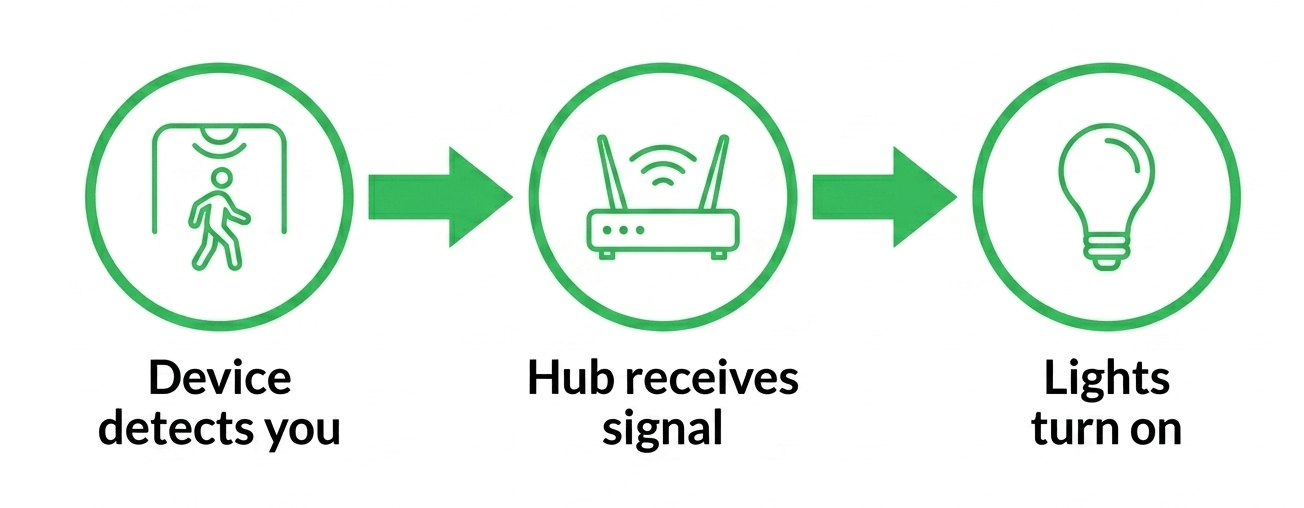
A smart home works by connecting internet-enabled devices (IoT) to a central network, allowing for remote control via smartphones, voice assistants (e.g., Alexa, Google Assistant), or automated routines.
Every smart home follows the same 3-step loop. A device sends a signal, a hub or app receives it, and a rule you set decides what happens next.
| 1 A device sends a signal. Your motion sensor detects you walking into the hallway. Your phone's GPS shows you are 1km from home. Your schedule says it is 7am. Any of these is a trigger – a signal your smart home acts on. |
| 2 A hub or app receives it. The signal travels through your WiFi or a low-power protocol like Zigbee to a central hub. Think of the hub as the brain – it listens to every device simultaneously and knows which rule applies. |
| 3 An automation runs. The hub fires the instruction: turn on the hallway light, cool the living room to 24°C, unlock the door. The rule you set once runs every time the trigger fires – no app-opening required. |
💡 The Key Distinction
A remote-controlled home lets you press a button from your phone. A smart home acts before you need to press anything. The difference is automation – rules that run based on time, location, or sensor data, not on you remembering to tap an app.
How to Set-up a Smart Home?
Think of a smart home as a team rather than a single gadget. To avoid buying incompatible smart home devices, you should follow this specific order of operations.
WiFi Network
The FoundationBefore anything else, you need a stable signal. Every other part of the system relies on this connection to communicate.
Hub
This acts as the "translator." It manages small signals from sensors and switches, ensuring they don't clog up your main WiFi traffic.
Ecosystem
Deciding between Google or Apple now ensures that every device you buy in the next step is actually compatible.
Smart Devices
With your platform set, you can now safely purchase the smart home devices such as switches, locks, and cameras that fit your specific ecosystem.
Automations and Scenes
This is where you program your hardware to work together, like turning off all lights when the last person leaves the house.






Top Smart Home Upgrades for
Singapore Homes
Not every smart home device delivers equal value. These 5 upgrades have the highest impact for most Singapore households - ranked by how immediately you will notice the difference.
1 Aircon Controller
The highest-value upgrade for Singapore given the climate. An IR blaster plugs into a power point near your aircon and gives you full app control over any unit with a standard IR remote. Pre-cool before you arrive, auto-off at night. Most households recover the cost through lower electricity bills within a few months.
2 Smart Wall Switches
Unlike smart bulbs, a smart switch controls your existing ceiling light from the wall point – no bulb replacement required. A "Master Off" automation turns every light in the house off when you leave. Works with most HDB ceiling lights as long as you have a neutral wire in the switch box.
3 Digital Door Lock
No more key cutting or worrying about lost keys. Issue temporary PIN codes for domestic helpers or delivery drivers and revoke them remotely when needed. Most HDB-compatible models use the standard HDB mortise lock spec – verify your gate type before ordering.
4 Smart Curtains or Blinds
Automated curtains close during peak afternoon heat (reducing solar gain and aircon load) and open at sunrise to help you wake naturally. Particularly valuable for bedrooms on west-facing units where afternoon sun is intense. A motorised track retrofit typically fits any existing curtain rail.
5 Robot Vacuum
The most visible automation in most Singapore homes. Set it to run while you are at work and return to dock before you arrive. Modern models handle HDB layouts with multiple room boundaries, transition strips between tiles and vinyl, and tight areas under platform beds.
How to Get Started?
The biggest mistake people make is buying hardware before they have a strategy. If you want a home that feels intuitive rather than intrusive, follow this professional deployment order.
Identify high-friction pain points
Smart homes shouldn't just be about "remote control" from a phone. They should solve recurring issues. Whether it is a water heater that stays on too long or a dark hallway that needs automated path lighting, pick one specific inefficiency to solve. If a device doesn't automate a chore away, it is just adding noise to your network.
Confirm your WiFi coverage
Walk around your flat or condo with your phone's WiFi indicator open. If signal drops below 2 bars in any room where you plan to put a device, fix the coverage before buying anything. A mesh node or router repositioning takes 20 minutes and prevents months of frustrating dropouts.
Commit to a single ecosystem
Fragmented systems are the leading cause of "smart home fatigue." Choose one primary platform like Google Home, Apple Home, or Alexa and stay within those guardrails. Ensuring every device natively talks to the same central hub is the only way to achieve a seamless, unified experience for everyone in the house.
Add one device at a time
Dumping ten devices onto your WiFi at once is a recipe for interference and pairing failures. Add one device at a time and monitor its stability for 24 hours. This deliberate pace allows you to confirm your 2.4GHz coverage is sufficient before the next layer of hardware is added.
Validate manual response before building automations
Automations are only as reliable as the underlying connection. Before building complex routines, ensure the device responds instantly to manual app toggles. If there is a delay in a simple on or off command, that lag will eventually break your more advanced automations.
Build your first automation
Focus on automations that provide immediate, tangible value. A geofenced routine that pre-cools your living room before you arrive home is a perfect "proof of concept." When the house starts anticipating your needs without input, the value of the entire system becomes clear.
Name devices clearly
Professional setups use clear, room-based labels like Kitchen Downlights or Master AC. Avoid generic manufacturer names. Clean naming makes voice control feel natural for guests and simplifies management as you scale to dozens of devices across multiple rooms.
Expert Advice: Don't try to automate your entire home in a single weekend. Focus on perfecting one room at a time. A small, bulletproof setup is infinitely better than a massive, unreliable one that requires constant troubleshooting.
Frequently Asked Questions
Q Do I need a neutral wire for a smart switch?
Most smart switches require one. Open your switch box and count the wires: three wires (live, neutral, earth) means you are compatible with most standard smart switches. Two wires means you will need a "no-neutral" switch or professional rewiring. While most modern HDB flats include neutral wires, it is best to verify before ordering hardware.
Q What is the difference between WiFi and Zigbee devices?
WiFi devices connect directly to your router, which is convenient but can crowd your network and consume more power. Zigbee devices connect to a dedicated hub. This is more efficient for sensors (which can run on batteries for years) and keeps your main WiFi clear for streaming and work. Most Singapore homes use a hybrid: WiFi for bandwidth-heavy cameras and Zigbee for light switches and sensors.
Q How much does a smart home cost in Singapore?
Entry-level upgrades like a smart plug start around S$18. Smart switches range from S$30 to S$80, plus installation. A comprehensive setup covering lighting, aircon control, security sensors, and a smart lock typically ranges from S$1,600 to S$2,600 for a standard apartment. Most households find it best to start with a few key devices and scale up over time.
Q What are the best first upgrades for a Singapore home?
Aircon control is often the highest value upgrade given our climate. Beyond that, smart wall switches allow you to automate lighting without changing every bulb. Smart door locks provide massive convenience for families, and automated curtains are a game-changer for bedrooms, closing automatically at sunset to maintain privacy and opening at sunrise to help you wake up naturally.
Q Do I need fast internet for a smart home?
You need stability more than speed. Most smart devices send very small control signals that use almost zero bandwidth. The exception is security cameras, which require decent upload speeds for live streaming. A standard fibre plan is perfectly sufficient. Your focus should be on consistent WiFi coverage across all rooms rather than paying for higher raw speeds.
Your Smart Home starts with Reliable WiFi
Every smart device runs on your WiFi. A slow or patchy connection means devices that drop offline, cameras that freeze, and automations that fire late. StarHub fibre broadband gives you the stable, low-latency foundation your smart home needs.
View broadband plans
Disclaimer:
This content is provided for general information and convenience. While we take care in preparing our articles, readers should refer to official sources or professional advice for specific, up-to-date details.
Related Articles
What Is 5Gbps Broadband and How Fast Is It?

 (1) (1).png)
10Gbps Broadband: Speed, Setup and XGS-PON Guide
