What is a Router? Modem vs Router Explained
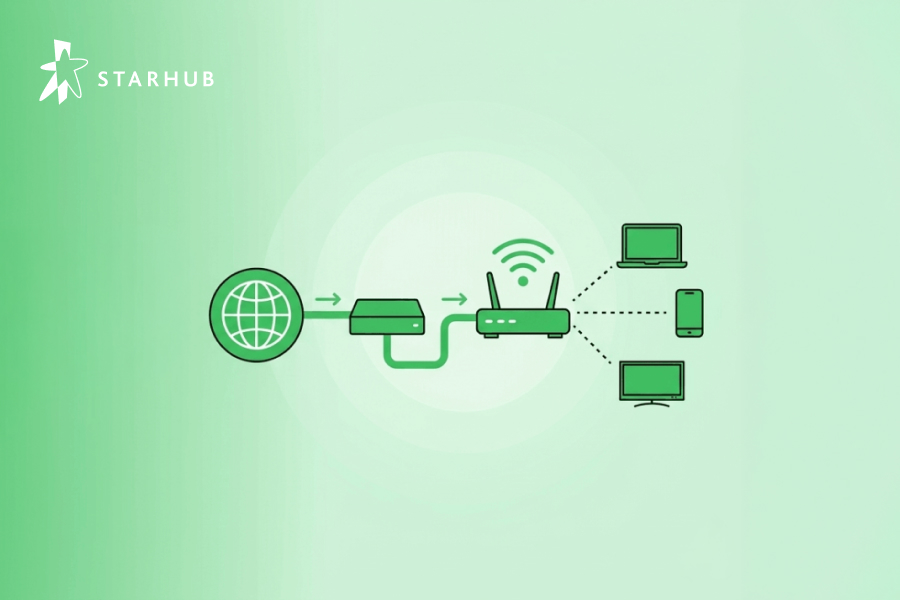
While they may look like similar black boxes with blinking lights, your modem and router perform 2 entirely different jobs. One brings the internet into your home, while the other shares it with your devices.
🆚 At a Glance: Modem vs. Router
| Feature | Modem (or ONT) | Router |
| Primary Goal | Connects your home to the ISP | Connects your devices to each other |
| Data Role | Translates signals from the street | Directs traffic to the right device |
| Connections | Usually has 1 LAN port | Multiple LAN ports + Wi-Fi antennas |
| Key Usage | Essential for internet access | Essential for Wi-Fi and security |
📡 What is a Modem?
A modem is a hardware device that connects your home network to your Internet Service Provider (ISP). Its primary function is to "modulate" and "demodulate" signals, translating the data from your ISP’s infrastructure into a digital format that your computer and router can understand.
Put simply:
The modem is the “interpreter” between your home and your ISP.
❓ How Does a Modem Work?
When an Internet signal leaves your ISP’s server and travels into your home, the first point of contact is your modem. However, at this stage, the signal is still in binary form – that is, a long string of digital 1s and 0s – which your devices aren’t able to process directly. Thus, your modem goes to work, converting that string of numbers into proper information, also known as analog form (modulation), which it then passes to your router for distribution.
Accordingly, the same process occurs in reverse (demodulation) when analog information is sent from your devices to the modem via your router, like when you look something up on Google.
🆚 Different Types of Modem Connections
There are 3 common types of modem connections, each catering to a different era of Internet connectivity:
- Dial-up Modem
Think of this as the internet’s vintage era. A dial-up modem connects to your ISP through a phone line, making those classic "beeps" and "boops" as it dials. It’s painfully slow by today’s standards and has mostly been replaced by faster options like broadband.
- DSL (Digital Subscriber Line) Modem
If you’ve ever used a landline phone and internet simultaneously, you’ve likely experienced DSL. This modem also uses phone lines but delivers much faster speeds than a dial-up connection - making it a huge upgrade for many households when it first arrived.
- Cable Modem
This is the option that many folks are probably most familiar with, second only to Optical Network Terminals (ONTs), the latter of which is more common in Singapore today. Here, a cable modem connects to your ISP via a cable TV line, offering reliable speeds for Web surfing, online gaming, streaming, and more.
🛜 What is a Router?
A router is a networking device that connects 2 or more packet-switched networks or subnetworks. It serves 2 primary functions: managing traffic between these networks by forwarding data packets to their intended IP addresses, and allowing multiple devices to use the same internet connection.
Most routers facilitate the exchange of data between LANs (Local Area Networks) and WANs (Wide Area Networks).
LAN: A group of connected devices (like those in your home or office) restricted to a specific area.
WAN: A large network spread over a vast geographic area (like the internet itself).
❓ How Does a Router Work?
To understand a router’s role, think of it as an air traffic controller and data packets as aircraft headed to different airports.
Just as each plane has a unique destination, each data packet needs to be guided to its destination as efficiently as possible. The router ensures these packets reach their destination IP address without getting lost or causing a disruption.
1. The Routing Table
In order to direct packets effectively, a router uses an internal routing table - a digital list of paths to various network destinations.
2. Packet Headers
When a packet arrives, the router reads the packet’s header (which contains destination information), consults its routing table to determine the most efficient path, and then forwards the packet to the next network in that path.
3. Router vs. Switch
It is common to confuse a router with a network switch. While they look similar:
A Switch forwards data between devices within the same network (e.g., connecting two computers in your study).
A Router forwards data between different networks (e.g., connecting your home network to the internet).
🛠️ How to Connect a Router to a Modem (Step-by-Step)
| Step | Action |
| 1. Identify Ports | Locate the LAN Port on your modem/ONT and the WAN Port on your router. |
| 2. Physical Link | Connect the two devices using a high-speed Ethernet cable. |
| 3. Modem Boot | Plug in your modem/ONT first and wait for the lights to stabilize. |
| 4. Router Boot | Once the modem is online, plug in the power for your router. |
| 5. Configuration | Access the router’s dashboard via a web browser or official mobile app. |
🌟 Find Broadband Peace of Mind with StarHub!
So, do you need both a modem and a router? Generally, the answer is yes. In Singapore’s fibre-rich landscape, this usually means an ONT (acting as your modem) paired with a high-performance router.
The good news? You don’t have to worry about the technical heavy lifting with StarHub. Our latest UltraSpeed 10Gbps Broadband plans are built for the modern, multi-device home. These plans feature next-generation Wi-Fi 7 routers that provide symmetrical speeds and ultra-low latency, ensuring your 8K streams and competitive gaming remain lag-free.
When you sign up, our ultra-skilled Hub Troopers will be there on-site for a professional installation and a personalized Wi-Fi coverage consultation. We’ll handle the ONT and router configuration for you, so you can enjoy total broadband peace of mind.
❓ Frequently Asked Questions
Related Articles
ONR vs ONT: What’s the Difference and Which Do You Need?
Fastest Internet Speed in the World: Singapore NGNBN Stats (2026)
What Is WiFi & Who Invented It? How it Works?

Back