Recommended Router Units
How many routers should I get for strong WiFi coverage?
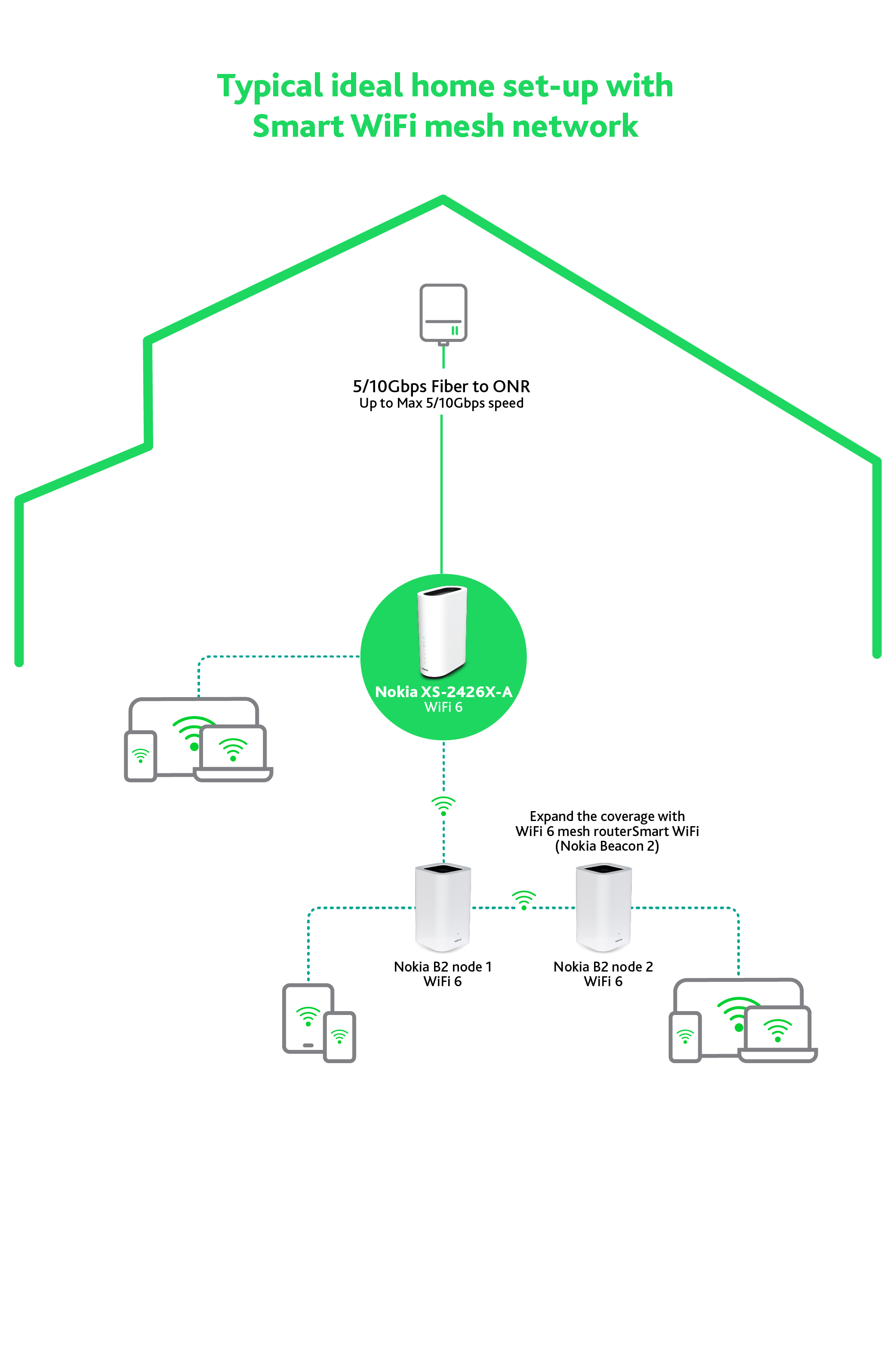
We recommend router placement as below:

StarHub UltraSpeed
What is StarHub UltraSpeed?
The StarHub UltraSpeed uses the latest fibre technology to deliver symmetrical upload and download that supports high-speed 10 gigabits per second (Gbps) symmetrical data transfers.
This means that StarHub fibre broadband service is now capable of delivering broadband network access at speeds of up to 10Gbps downstream and 10Gbps upstream.
How would StarHub UltraSpeed benefit me?
With StarHub UltraSpeed, you will be able to enjoy higher bandwidth and experience better performance when gaming (particularly cloud-based), using multiple streaming devices simultaneously, consuming higher resolution content (e.g., 4K and 8K video) and uploading content in real-time onto social media such as TikTok.
Do I need to change my router to be able to enjoy the benefit of StarHub UltraSpeed?
When you sign up for StarHub UltraSpeed 3/5/10Gbps plan, you can choose a powerful 10Gbps router that will best serve your needs. The good news is that our HubTrooper will do all the necessary setup for you.
How would StarHub UltraSpeed turn dead spots in my home into sweet spots?
With StarHub UltraSpeed coupled with our powerful 10Gbps router, you will enjoy higher bandwidth per square foot of living space. Hence, your home will be covered by StarHub’s powerful UltraSpeed Network, eliminating any dead spots.
I am always downloading and streaming movies. How would StarHub UltraSpeed improve my experience?
With StarHub UltraSpeed, you can download and upload plus stream movies in a matter of seconds. No more waiting time!
I am a gamer, how can StarHub UltraSpeed benefit me?
With StarHub UltraSpeed, you can game at 4K resolution without any lag and enjoy unmatched speed.
How can I be on StarHub UltraSpeed immediately?
All you need to do is to sign up for StarHub UltraSpeed 3/5/10Gbps plan immediately and couple it with the correct router. You will be enjoying the fast-lane internet experience in no time.
What is the experience like if my network delivers asymmetrical download and upload speed of up to 3/5/10Gbps?
Imagine being on a 3/5/10-lane highway where there is zero chance of traffic congestion. That is what it is like having a symmetrical download and upload speed of up to 3/5/10Gbps.
If I sign up for a StarHub 1Gbps or 2Gbps plan, would I be able to enjoy the benefit of StarHub UltraSpeed immediately?
Currently, only the UltraSpeed 3/5/10Gbps plan offers the immediate benefit of being part of the StarHub UltraSpeed Network. Customers on 1Gbps and 2Gbps will be migrated to the StarHub UltraSpeed Network progressively. We recommend that you subscribe to UltraSpeed 3/5/10Gbps as your preferred choice of broadband plan to enjoy the immediate benefits.
I am an existing StarHub Broadband customer, when will I be upgraded to StarHub UltraSpeed Network?
Migration of StarHub Broadband customers to the UltraSpeed Network will be conducted progressively and we will keep our customers updated.
General
What is UltraSpeed service?
UltraSpeed services includes Ultraspeed and 10Gbps Broadband plans on a 24 months contract. Ultraspeed 10Gbps as of 29 April 2024 has been upgraded to a commercial plan with no changes to subscribers broadband speed, subscription rates, or contract terms.
Why should I subscribe to UltraSpeed or 10Gbps?
With more devices (such as security camera, TV, fridges etc.) connecting to Broadband and higher demand of bandwidth from every individual at home (streaming videos, working from home, playing games etc.). UltraSpeed 5Gbps and 10Gbps is the plan to go for lag–free connectivity for multiple users and devices in one home as there will always be enough bandwidth to go around.
What is the price of UltraSpeed 3/5/10 Gbps after the 24 months contract period?
There will be no change in customers monthly subscription price for UltraSpeed 3/5/10Gbps even after the 24 months contract period. Customers will continue to enjoy at the same price as per the first 24 months.
Can I transfer my StarHub UltraSpeed service to another person?
For HomeHub+ customers, please refer here for more information.
If you have a standalone UltraSpeed Broadband plan, yes you can. Please proceed to any of our StarHub Main Shops or fill in this form and submit it via our webform.
Notes:
- Copies of original document IDs for both parties are required.
- Both parties must clear any outstanding bills before the transfer.
- Transfer is subject to eligibility at StarHub's discretion.
Signing up for StarHub UltraSpeed
Who is eligible to sign up for StarHub UltraSpeed 3/5/10Gbps plan?
StarHub UltraSpeed 3/5/10Gbps plan is available to all new and existing StarHub broadband customers.
How do I sign up to StarHub UltraSpeed 3/5/10Gbps plan?
You can easily sign up for StarHub UltraSpeed 5/10Gbps plan via our Online Store or StarHub Shops or call our hotline at 1630 (Mondays - Sundays, 9 am - 8 pm).
I am an existing Fibre Broadband customer with 1Gbps/2Gbps Fibre Broadband. Can I recontract or upgrade to UltraSpeed 3/5/10Gbps plan?
Absolutely! Simply sign up for StarHub UltraSpeed 3/5/10Gbps plan via our Online Store or StarHub Shops or call our hotline at 1630 (Mondays - Sundays, 9 am - 8 pm).
I am a new StarHub Fibre Broadband customer and would like to sign up for the UltraSpeed 5Gbps or 10Gbps service. Is service installation and activation fees inclusive in the plan?
Good news, installation fee and activation fee worth $149.45 will be waived for UltraSpeed 5Gbps and 10Gbps.
Setting up StarHub UltraSpeed
I am a new StarHub Fibre Broadband customer and would like to sign up for the UltraSpeed 3/5/10Gbps service. Is service installation and activation fees
inclusive in the plan?
Good news, installation fee and activation fee worth $149.45 will be waived for UltraSpeed 3/5/10Gbps.
Are there any other charges involved for signing up to StarHub UltraSpeed 3/5/10Gbps?
In the event the Fibre Termination Point (FTP) is faulty or new FTP port is required, the third party NLT charges may apply:
- TP installation: $182.03 (high-rise)/$333.54 (landed).
- TP RRR (Relocation, Repair and Replacement and Removal Charge): $184.21 (high-rise)/$336.81 (landed).
Will I need a new Fibre Termination Point for StarHub UltraSpeed 3/5/10Gbps?
UltraSpeed needs a dedicated Fibre Termination Point (FTP). If both existing FTP ports are occupied, a new FTP will be required. Below charge from NetLink Trust for FTP applies:
- TP installation: $182.03 (high-rise)/$333.54 (landed).
What are the system requirements I need to enjoy the optimum speed of StarHub UltraSpeed 3/5/10Gbps?
The following is minimum requirement to enjoy optimal experience:
| Item | Requirement |
| CPU | i7 Quad Core |
| RAM | 16GB |
| Hard disk | SSD/PCI-e |
| Operating system | Windows 10 or Mac OS 10 & above |
| LAN cables | Cat6/6a (for connecting to 10Gbps LAN port) Cat5e (for connecting to 1Gbps LAN port) |
| Network adapter | Desktop with PCI-E 10GBase-T Network Adaptor Or Laptop/Desktop with ThunderboltTM 3 USB-C Type Connector and Thunderbolt 3 to 10GBase-T Ethernet Adaptor |
What is the optimal speedtest result I will get if I have the compatible devices?
The typical speed test result of UltraSpeed 3/5/10Gbps plan can reach up to 3x/5x/10x the speedtest result of 1Gbps Fibre Broadband over wired connection.
The speed test result is highly dependent on various factors which includes:
- Devices used (please refer to Question 4 above).
- The configuration of the devices (e.g. firewall, anti-virus, etc).
- Period of testing (e.g. peak period or non-peak period).
- The website customer is surfing. Other external factors such as internet congestion.
I do not have the compatible devices at home. How do I enjoy the benefits of StarHub UltraSpeed 3/5/10Gbps plan?
Great news, UltraSpeed 3/5/10Gbps plan allows you to share 3X/5X/10X more bandwidth across multiple devices with everyone at home. As such, you will still benefit from the huge bandwidth offered by UltraSpeed 3/5/10Gbps plan even without compatible devices with improved download & upload speed.
Can I connect the fibre connection to a different part of my house or on a different level?
Yes, you can. There are two ways to do that:
a) Connect via in-house wired LAN cable.
b) Connect via Wi-Fi mesh router that can expand coverage to various part of the house wirelessly.
Does StarHub UltraSpeed 3/5/10Gbps plan use a dynamic or static IP address?
StarHub UltraSpeed 3/5/10Gbps uses a dynamic IP address.
Is StarHub UltraSpeed 3/5/10Gbps plan suitable for security cameras?
StarHub UltraSpeed 3/5/10Gbps plan uses a dynamic IP address. Please check with the
manufacturer of your security camera if a dynamic address is suitable.
I am currently on StarHub’s Fibre Broadband with Fibre TV. How should I reconfigure the setup when I recontract to the UltraSpeed service?
Fibre TV service is currently not supported by StarHub UltraSpeed 3/5/10Gbps plan. You may wish to upgrade your Fibre TV service to TV+ which is supported by StarHub UltraSpeed 3/5/10Gbps plan.
Does your HomeHub+ plan come with a StarHub UltraSpeed 10Gbps plan option?
Yes! You can sign up to HomeHub+ UltraSpeed at www.StarHub.com/ultraspeed or simply visit one of our retails stores to sign up.
Can I sign up for StarHub Add-ons (e.g. CyberProtect) with StarHub UltraSpeed 3/5/10Gbps plan?
Yes, add-ons are available with StarHub UltraSpeed 3/5/10Gbps plan.
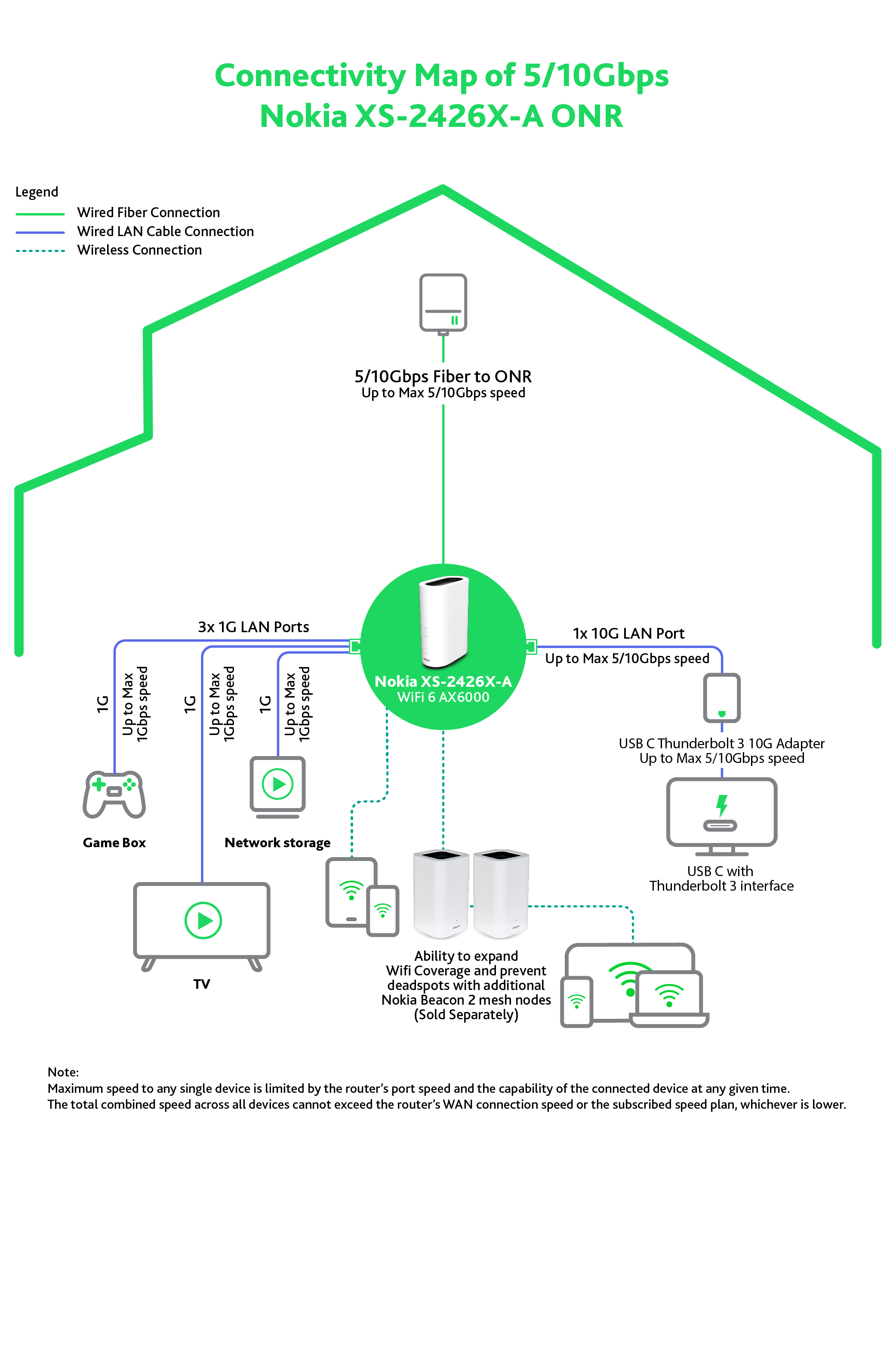
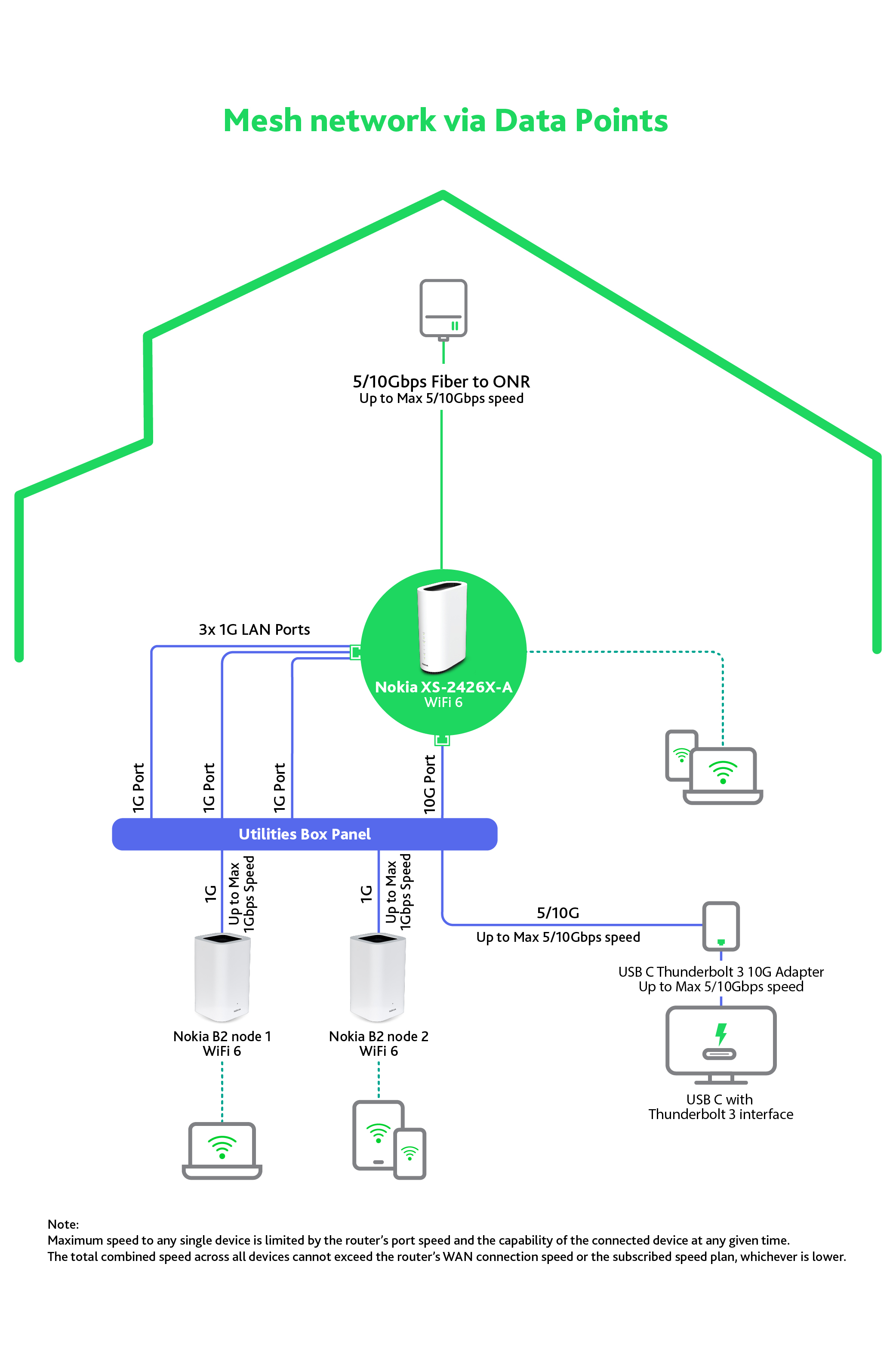
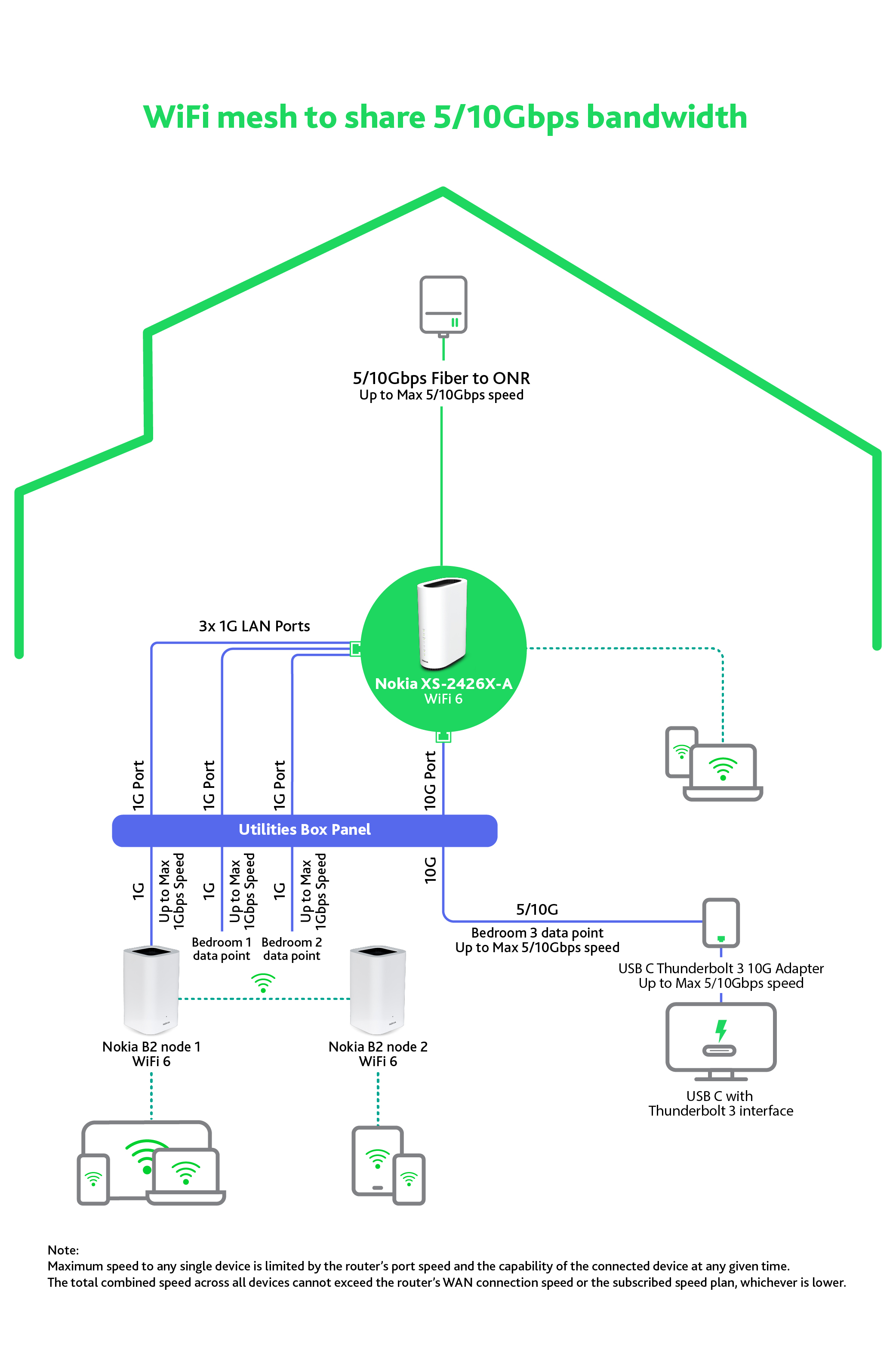
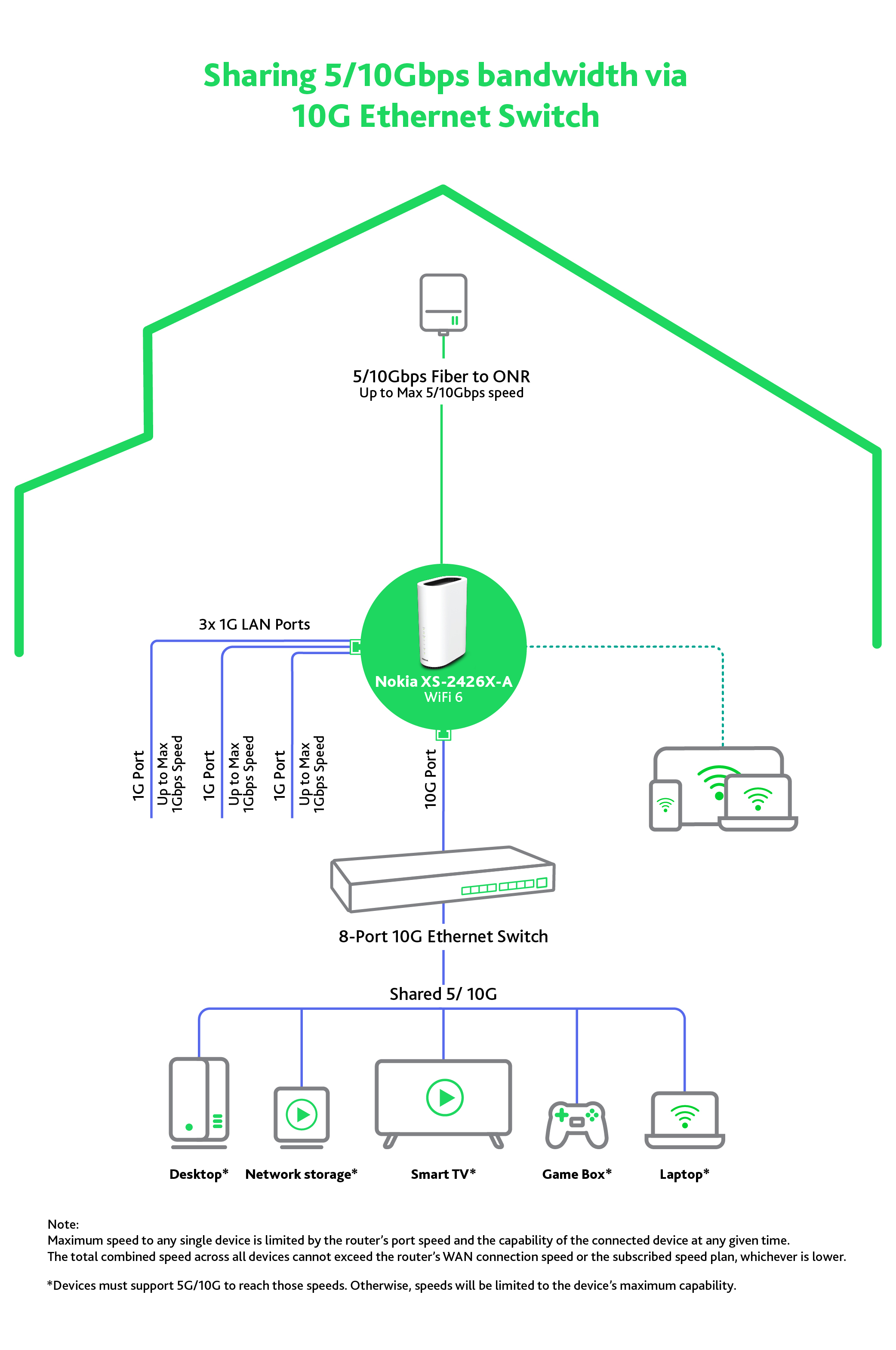
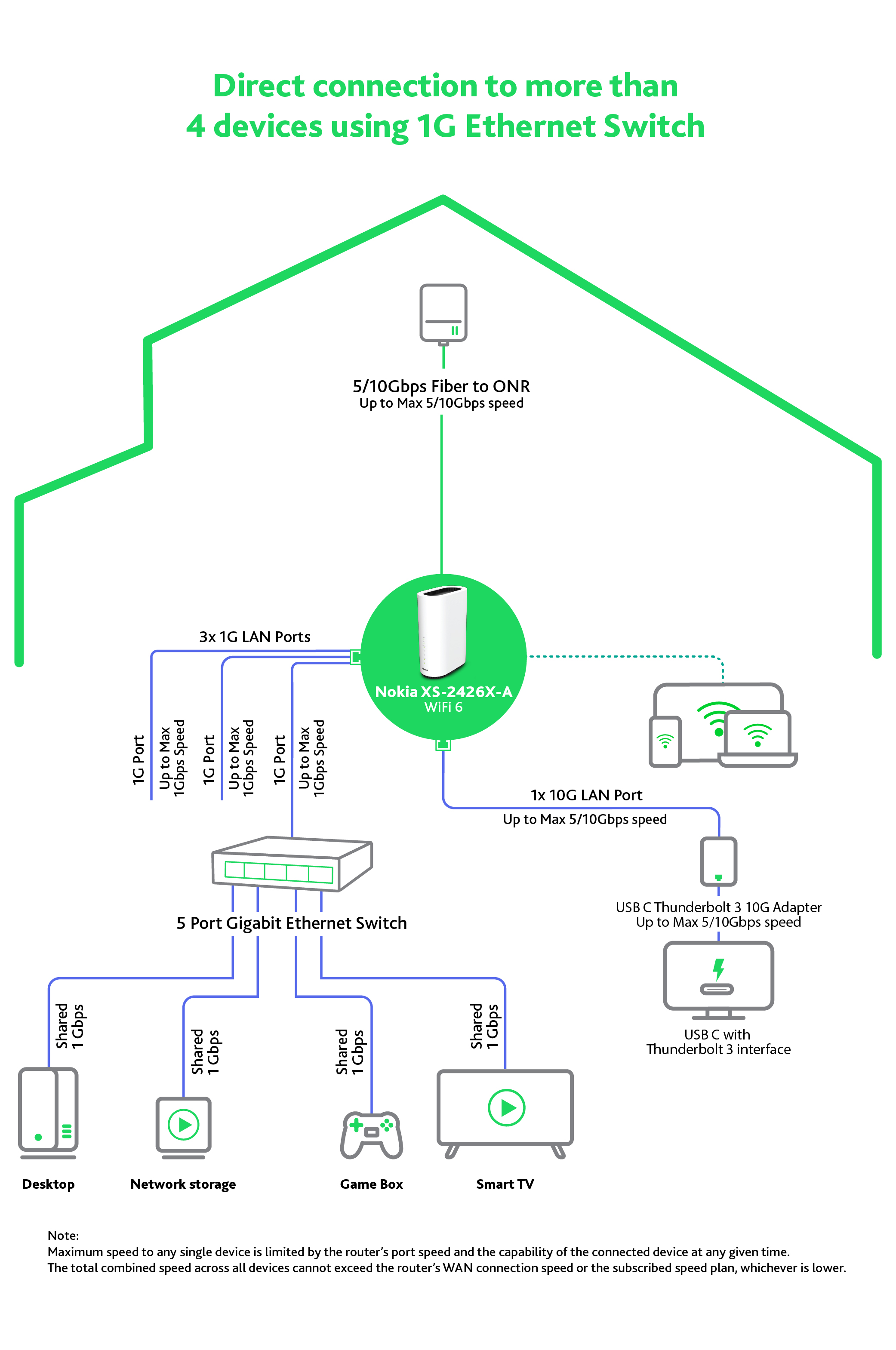
What is the connectivity diagram for UltraSpeed 5Gbps/10Gbps plan using the Nokia XS-2426X-A ONR
WiFi 7
What is WiFi 7?
WiFi 7 is the upcoming WiFi standard, also known as IEEE 802.11be Extremely High Throughput (EHT). It works across all three bands (2.4 GHz, 5 GHz, and 6 GHz) to fully utilize spectrum resources. While WiFi 6 was built in response to the growing number of devices in the world, the goal of Wifi 7 to deliver astounding speeds for every device with greater efficiency. If you're struggling with constant buffering, lag, or congestion, a WiFi 7 router may be your best solution.
WiFi 7 introduces 320 MHz ultra-wide bandwidth, 4096-QAM, Multi-RU, and Multi-Link Operation to provide speeds 4.8× faster than WiFi 6 and 13× faster than WiFi 5.
For WiFi 7 to work at its best, it requires both router and end point client (PC or mobile phone) to support WiFi 7 to take advantage of the technology upgrade. End client devices that are not on WiFi 7 can still use the router as WiFi 7 is backward compatible to other WiFi standards such as 6E/6/5. User can stand to benefit from the strong wireless backhaul that covers the house in multi- gig speeds when connected to another compatible mesh node.
What can 320MHz on 6Ghz band do?
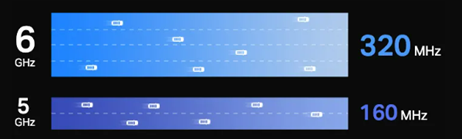
WiFi 7 unleashes the full potential of the 6GHz band which is to double the bandwidth of the last generation (160Mhz). Extending channel width to 320MHz also enables many more simultaneous transmissions at the fastest possible speeds.
What is 4k-QAM?
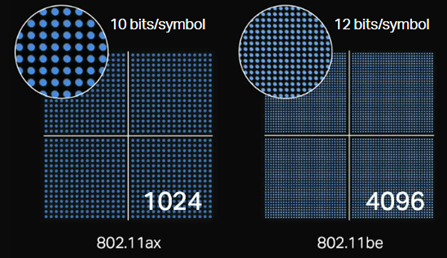
To further enhance peak rates, WiFi 7 adopts a higher-order modulation scheme: 4096-QAM. This enables each symbol to carry 12 bits rather than 10 bits, which means 20% higher theoretical transmission rates than WiFi 6’s 1024-QAM. A higher transmission rate allows users to obtain higher transmission efficiency. Now you can watch flawless 4K/8K videos, play massive online games without lag, or live stream smoothly from your home computer.
What is Multi Resource Unit (Multi-RU)?
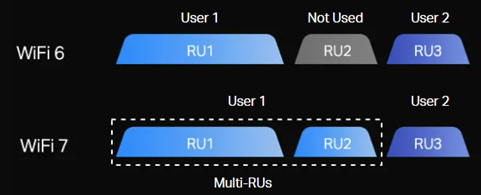
With WiFi 6, each user can only send or receive frames on an assigned resource unit (RU), which significantly limits the flexibility of the spectrum resource scheduling. To solve this problem and further enhance spectral efficiency, WiFi 7 allows multiple RUs to be assigned to a single user and can combine RUs for increased transmission efficiency.
What is Multi-Link Operation (MLO)?
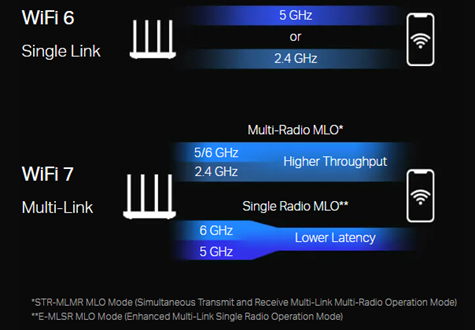
Traditional WiFi devices use a single link to transmit data. With different Multi-link Operation (MLO) Modes, WiFi 7 enables devices to use multi-link aggregation to achieve higher throughput, lower latency, and higher reliability; or to use multi-link seamless dynamic switching to achieve load balancing and lower latency.